

An automated workflow using integromat
Connects Teamwork
Move completed tasks between Teamwork projects
About this workflow template
It can be build using Integromat, a no-code workflow automation tool. Integromat allows you to create automated scripts using a simple drag-and-drop interface for non-technical users. This is a ready-made scenario, but it can be customized by adding more apps, actions, filters or branches.
Categories
Teamwork can also be integrated using automation tools other than integromat:


Diagram
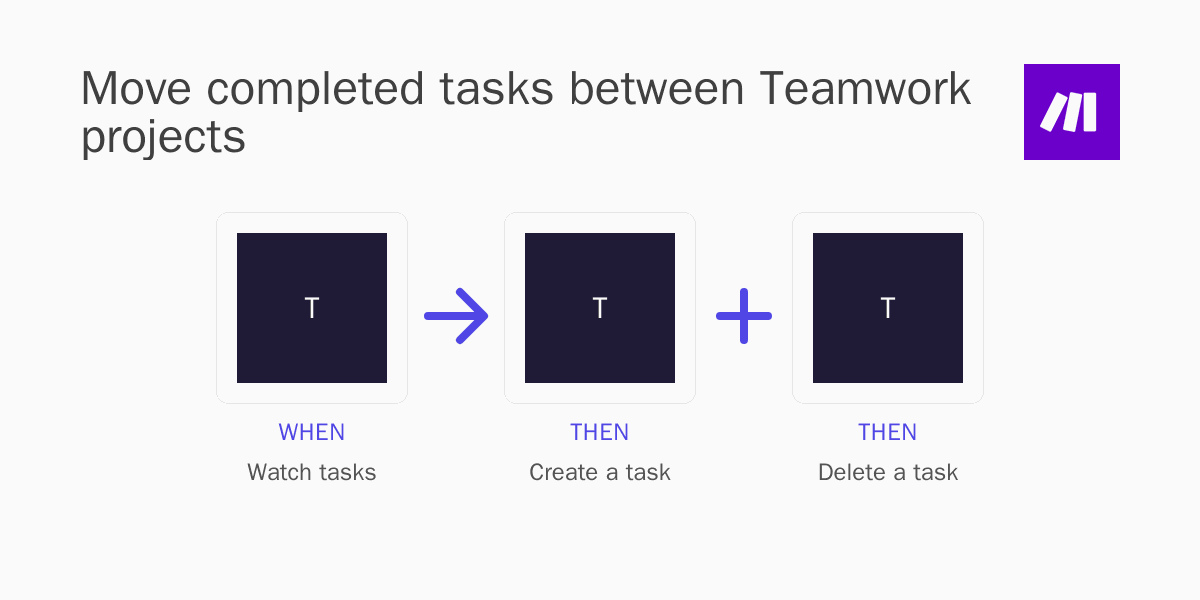
How it works?
When this trigger fires in Teamwork

Watch tasks in Teamwork
Triggers when a new task is added.
Then these actions happen in Teamwork
Create a task in Teamwork
Adds a new task to a specified task list.
Delete a task in Teamwork
Deletes a task with a given ID.
How to set up this workflow
This guide contains information on how to set up an automatic workflow that allows to Move completed tasks between Teamwork projects.
Part I
Configure Applications
First, we need to connect Teamwork to Make.com.

Create Make.com account.
Create Make.com account if you don't have one.

Connect Teamwork to Make.com.
Give Make.com access to your Teamwork account, using Teamwork credentials.
Part II
Build an integration workflow
Next, we need to create a workflow automation scenario using graphical no-code web interface of Make.com.

Set up a Trigger action for Teamwork
Choose the following trigger: Watch tasks (Triggers when a new task is added.).

Then set up an Action for Teamwork
Choose this action: Create a task (Adds a new task to a specified task list.).
Then set up another Action for Teamwork
Choose this action: Delete a task (Deletes a task with a given ID.).
Part III
Test and Publish
Finally, we need to test this automation and publish it.

Customize data flow
Configure the data that is exchanged between Teamwork.

Test the workflow and turn it on for production use
Test your scenario and publish to production. Now you have an automatic workflow, that will Move completed tasks between Teamwork projects!
Related Automation Templates


Supported triggers and actions

New task
Triggered when you add a new task.

 triggerbyzapierpabbly-connect
New task (instant)
New task (instant)
 triggerbypipedream
New task deleted (instant)
New task deleted (instant)
triggerbypipedreamNew task updated (instant)
New task updated (instant)
triggerbypipedreamNew project
Triggered when you add a new project.
triggerbyzapierpabbly-connectWatch tasks
Triggers when a new task is added.
 triggerbyintegromat
Create task
Creates a new task.
 actionbyzapierintegratelypabbly-connectpipedream
Update task
Updates an existing task.
actionbyzapierintegratelypipedreamDelete task
Delete task
actionbypipedreamList project tasks
List project tasks
actionbypipedreamCreate project
Creates a new project.
 actionbyzapierintegratelypabbly-connectalbato
Upload file to project
Uploads a file to a project.
actionbyzapierintegrately
Apps you need


Make.com (Integromat) is a powerful automation tool that enables users to connect their favorite apps, services, and devices without any coding skills. With its unique features, users can automate even complex integrations easily and efficiently, saving time and effort. Integromat allows to connect apps and automate processes in a few clicks.


